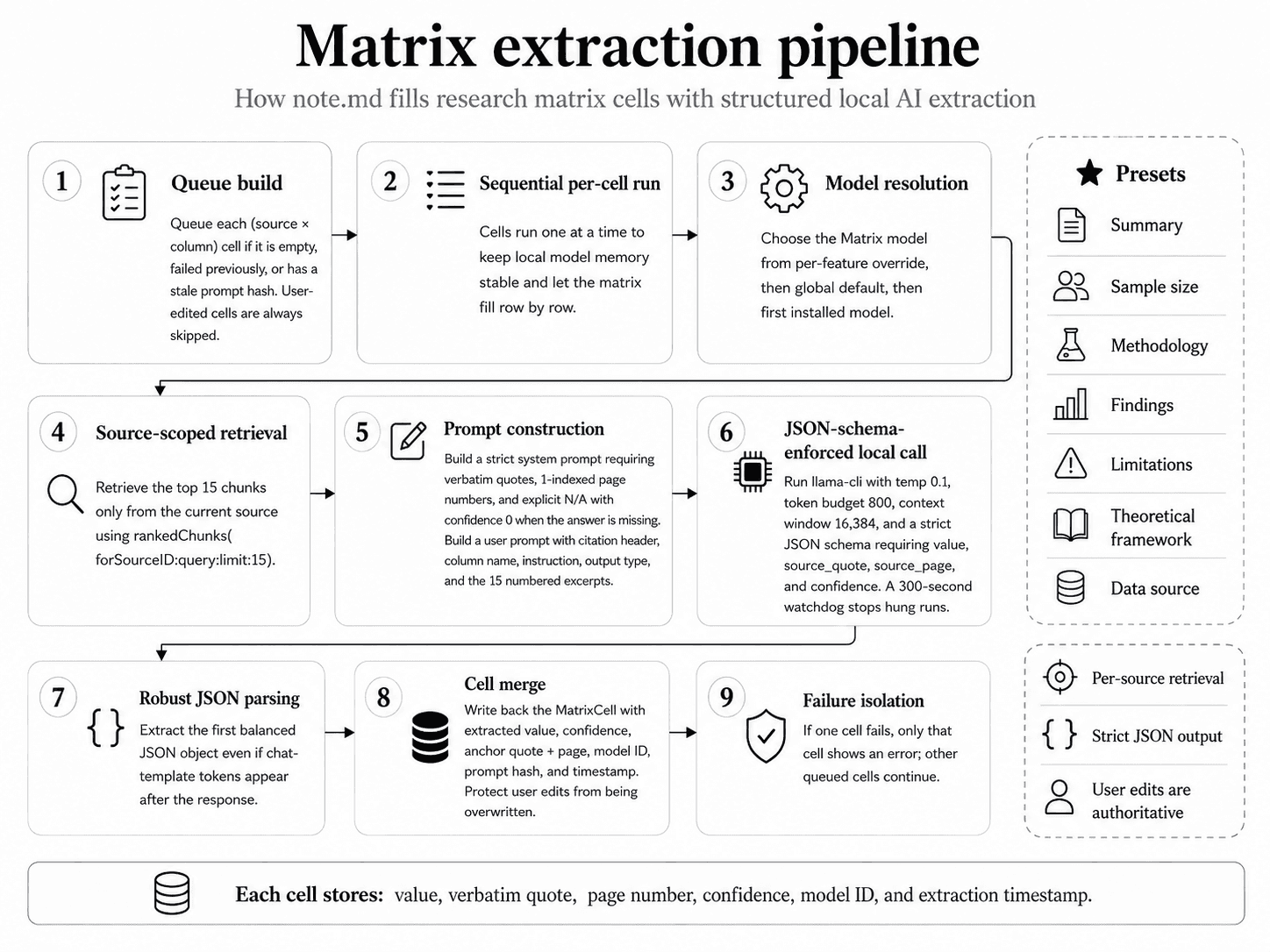
A Matrix is a table where rows are sources and columns are extraction prompts. When you click Extract, the engine fills every empty or stale cell by sending a tightly scoped prompt to a local LLM and getting back structured JSON.
One cell at a time.
Matrix extraction is built around a simple promise: every cell value is grounded in a verbatim quote from a real page of the cited paper. To deliver that, the engine sequences each cell carefully — local retrieval, schema-enforced LLM call, robust parsing — and isolates failures so one bad cell never kills the run.
Step by step.
- 1
Queue build
The view model walks every
(source × column)pair and queues a cell if:- the cell is empty, or
- it has an error from the previous run, or
- the column's prompt has changed since the cell was last extracted (detected via a stored prompt hash).
- 2
Sequential per-cell run
Cells run one at a time, not in parallel. This keeps memory pressure on the local LLM low and lets you watch the matrix fill in row by row.
- 3
Model resolution
For each cell, the engine resolves which local Gemma 4 variant to use:
- First checks for a per-feature override (set in AI Settings → Per-feature Model → Matrix).
- Falls back to the global default model.
- Falls back to the first installed model if neither is set.
This lets you pair a smaller Gemma variant with Matrix (faster extraction across many cells) and a larger one with Evidence Scan (more careful reasoning on individual claims) — all on the same machine, all local.
- 4
Source-scoped retrieval
The semantic search service is asked for the top 15 chunks from this source that match the column's prompt. This is the critical design choice: retrieval is per-source, not project-wide. Without it the LLM would frequently see chunks from the wrong paper.
- 5
Prompt construction
The engine builds two prompts:
- A system prompt that mandates verbatim quotes, 1-indexed page numbers, and explicit "N/A" (with confidence 0) when the source does not contain the answer.
- A user prompt with the paper's citation header, the column name + instruction, an output-type hint (text, number, list), and the 15 retrieved excerpts numbered with their page labels.
- 6
JSON-schema-enforced call
The local LLM is invoked via the bundled
llama-clibinary with:--temp 0.1 # near-deterministic output -n 800 # token budget -c 16384 # context window --json-schema # value, source_quote, source_page, confidence
A 300-second watchdog terminates hung processes.
- 7
Robust JSON parsing
llama-cliappends chat-template tokens after the JSON body, so the engine walks the output character by character tracking brace depth and string state to slice out the first balanced JSON object. This survives most output quirks. - 8
Cell merge
The parsed result is written back as a
MatrixCellwith the value, confidence, anchor (source quote + page index), model ID, prompt hash, and extraction timestamp. The cell is double-guarded so a user edit that came in mid-run cannot be overwritten. - 9
Per-cell failure isolation
If one cell fails — timeout, malformed JSON, retrieval miss — only that cell shows an error indicator. The remaining cells continue. Cancel from the toolbar to stop the run mid-queue.
Presets.
The Add Column menu ships with curated presets. Each is just a name + prompt + output type — you can edit them or write your own.
| Preset | What it asks for |
|---|---|
| Summary | Brief overall summary of the paper |
| Sample size | Number of participants or observations |
| Methodology | Study design, approach, instruments |
| Findings | Main quantitative or qualitative results |
| Limitations | Author-stated limitations or caveats |
| Theoretical framework | Underlying theory the paper builds on |
| Data source | Datasets, archives, or collection sites used |
What you get back.
Per cell:
- A short extracted value (the cell's display text).
- A verbatim source quote.
- A page number (1-indexed in the UI, 0-indexed internally on the anchor).
- A confidence score 0–1.
Clicking a cell opens a detail modal with the quote rendered as a blockquote — and the anchor lets you jump straight to that page in the Reading Studio.