note.md is a fully local-first academic writing app. Every step described in this series runs on your Mac — no document, embedding, or claim leaves the device unless you explicitly export it.
One index. Four pipelines.
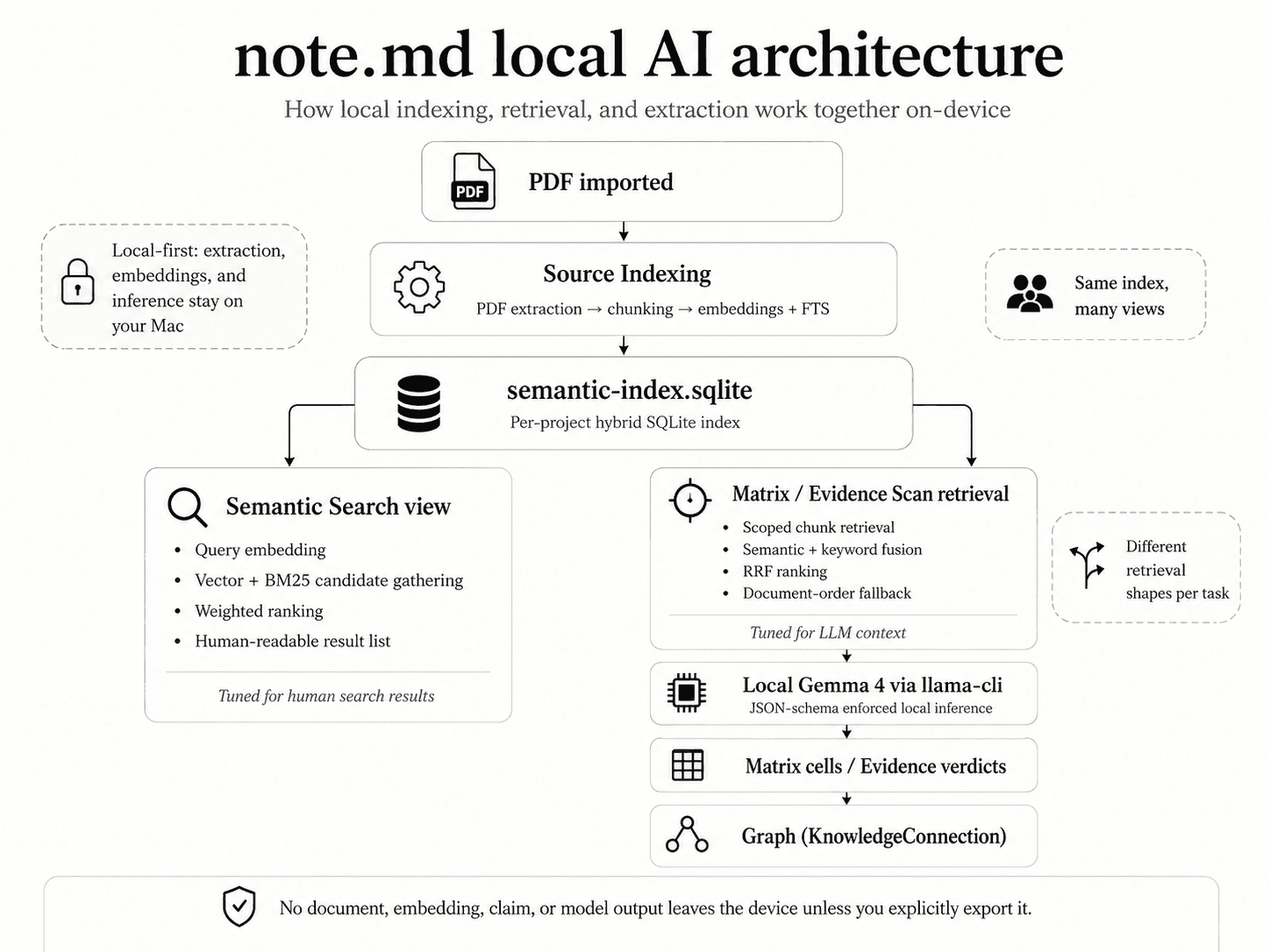
Under the hood, note.md is four pipelines stacked on a single local index. They each do one thing well, and they all read from — and write to — the same hybrid SQLite database that lives inside your project.
The four pipelines.
Each pipeline is documented end-to-end in its own article. Together they cover the entire local-AI surface of note.md.
- 01 · Indexing
Source indexing →
A freshly imported PDF is extracted with MinerU, chunked under its headings, embedded with Nomic Embed Text v1.5, and stored alongside an FTS5 full-text index.
- 02 · Retrieval
Hybrid semantic search →
Vector similarity and BM25 keyword search run in parallel, then merge — with weighted scoring for the human-facing Search view, and Reciprocal Rank Fusion for the LLM-facing Matrix and Evidence Scan paths.
- 03 · Extraction
Matrix extraction →
A row-by-row LLM pipeline fills research matrices with structured JSON — verbatim quotes, page numbers, and confidence scores — using a strict JSON schema enforced by the local
llama-clibinary. - 04 · Verification
Evidence Scan →
For a given claim in your writing, retrieves passages from across your sources and classifies each one as supports, contradicts, nuanced, or irrelevant — then lets you insert any of them as a typed citation.
Different shapes per task.
The same chunks are useful in different ways depending on who is consuming them. Search-view retrieval is tuned for human eyeballs — weighted scoring, exact-phrase boosts, one chunk per source, and a soft similarity threshold so the long tail does not pad the list. Matrix and Evidence Scan retrieval is tuned for LLM consumption — Reciprocal Rank Fusion, scoping that keeps the model focused on the right paper, and a document-order fallback so the AI never sees an empty context.
PDF imported
   ▼
Source indexing  →  chunks  +  embeddings  +  FTS5
   ▼
semantic-index.sqlite   (per project, hybrid)
   │
   ├── Semantic Search view      →  human-readable results
   │      weighted scoring, one-per-source, threshold
   │
   └── Matrix / Evidence Scan    →  LLM context
          RRF, scoped or cross-source, document-order fallback
                   ▼
          Gemma 4 via llama-cli  (JSON-schema enforced, on-device)
                   ▼
          Matrix cells / Evidence verdicts
                   ▼
          Graph (KnowledgeConnection)
The takeaway: retrieval shape follows consumer. Humans get ranked, deduplicated lists; LLMs get tightly-scoped context with fallbacks. The underlying chunks are the same.
Privacy, briefly.
Everything described above runs locally. The bundled llama-cli and llama-embedding binaries are stock llama.cpp builds shipped inside the app. The model weights you download — Gemma 4 variants for inference, Nomic Embed Text v1.5 for embeddings — are stored in your user data directory.
Keep reading.
Each pipeline has its own article with the implementation details — chunk sizes, ranking math, model parameters, failure modes. Start with indexing (everything else depends on it) or jump to the feature you care about.