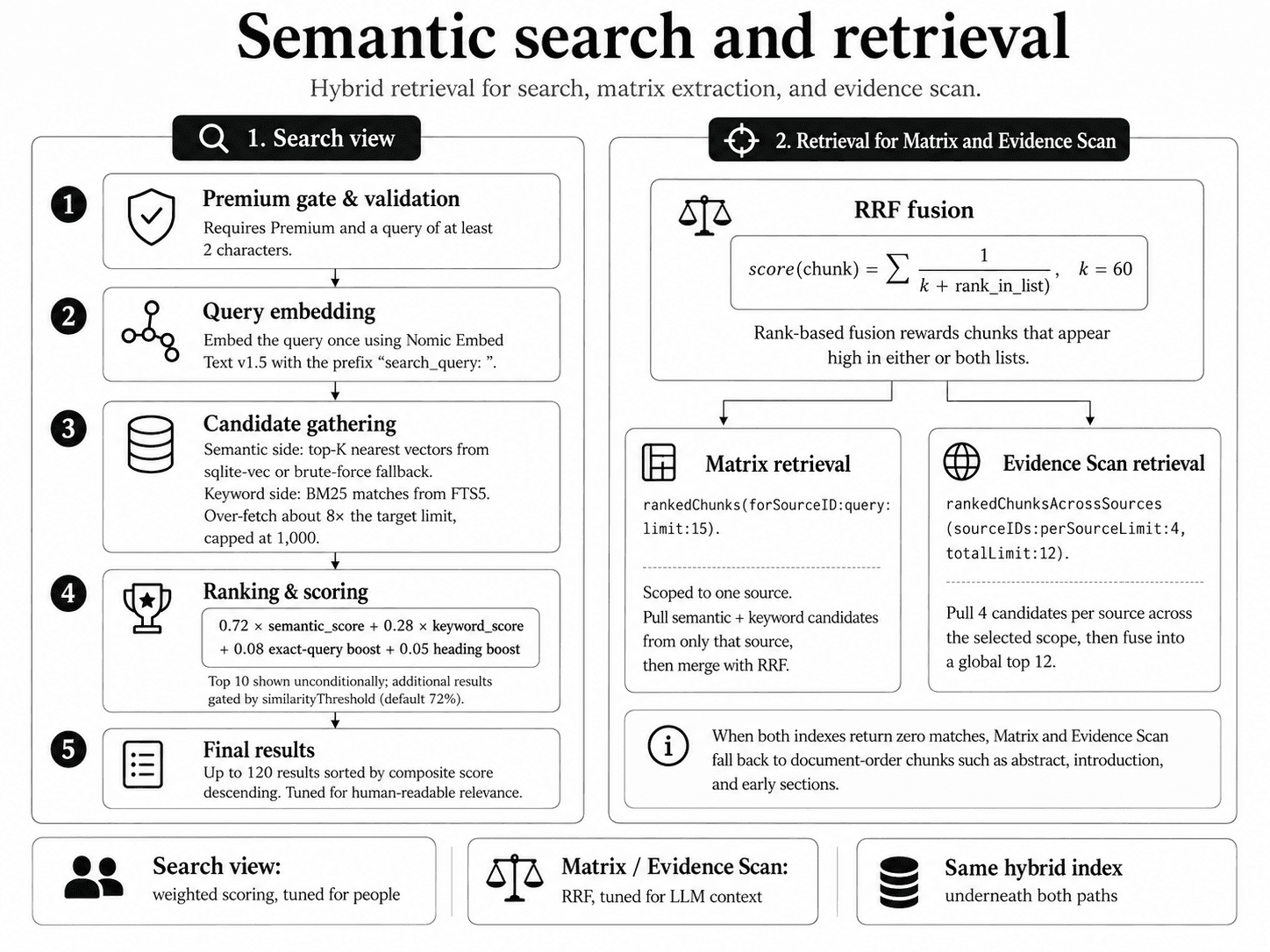
Indexing converts a freshly imported PDF into structured chunks of text, embeds those chunks into vectors, and stores everything in a local SQLite database so semantic search, Matrix, and Evidence Scan can all read from the same index.
What indexing does.
When you drop a PDF into a note.md project, it does not immediately become searchable. Behind the scenes, a background queue picks it up and runs it through a nine-step pipeline that turns the raw file into a structured local knowledge index. The output is reused by every downstream feature.
Step by step.
- 1
Import
When you add a PDF to a project, the file is copied into the project's knowledge vault and a
KnowledgeSourcerecord is created. The new source is queued onto a background queue (SourceShadowVaultService). - 2
Power-aware gating
Before any heavy work starts, the queue checks your Source Indexing preference. If it is set to "Only on Power Source" and you are on battery, the worker parks until the charger is plugged in. The check is driven by macOS's power-source notifications, so it reacts immediately when you connect or disconnect power.
- 3
Cache shortcut
If the source has already been indexed in a previous run and the file has not changed (matched by content hash), the indexer skips straight to the status banner. This is what makes opening an existing project instant rather than re-indexing every PDF from scratch.
- 4
PDF extraction
A bundled helper process (
notemd-extractor) is spawned per source. It runs MinerU's native extractor to produce three artifacts in the shadow folder:fulltext.txt— the raw text bodydocument.md— a Markdown reconstruction with headings preserved*_content_list.json— every paragraph, table, and heading with its page number
Each spawned process is registered so it can be cancelled cleanly if you close the project or delete the source.
- 5
Chunking
The text is split by
SourceChunkingService. The preferred path uses the structured JSON: paragraphs are grouped under their nearest heading and flushed when the joined text would exceed 1,200 characters. Headers, footers, and page numbers are dropped. Oversize blocks are split by paragraph → sentence → hard offset.If only Markdown is available, the chunker falls back to a heading-aware splitter with a 220-character overlap between chunks so context is preserved across boundaries.
- 6
Database write
Chunks are written to the project's SQLite database (
semantic-index.sqlite) inside a single atomic transaction. Old chunks for that source are wiped first so you never end up with stale duplicates. - 7
Embedding
Chunks are embedded in batches of 16 by a second bundled helper (
llama-embedding). The model is Nomic Embed Text v1.5 — a 768-dimensional embedding model that runs purely on CPU/Apple Silicon. Each chunk gets the prefix"search_document: "before embedding (the prefix is part of the Nomic recipe; queries get a matching"search_query: "prefix at search time).The vectors are stored both as binary blobs and, when available, in a
sqlite-vecvirtual table for fast approximate nearest-neighbor lookups. - 8
Full-text index
Alongside the vectors, every chunk is also indexed in an SQLite FTS5 virtual table for BM25 keyword search. Headings are indexed in a separate column so heading matches can be boosted at search time.
- 9
Status banner
While indexing runs, the editor shows an
IndexingStatusBannerwhenever there is pending or in-flight work. It refreshes on every artifact change notification so you always see the current state without polling.
What the user sees.
- A new PDF appears in Knowledge Management with a small "indexing" indicator.
- The Matrix and Evidence Scan show a "still indexing" banner if you try to use them before chunks are ready.
- On battery with the energy-saving preference enabled, indexing pauses cleanly and resumes when you reconnect power.
Design notes.
Local-first
All extraction, chunking, and embedding happens on-device. The two helper binaries are bundled inside the app — no network round-trips, no model downloads at first run.
Cancellable
Every long-running step (extraction, embedding) is wrapped in a cancellable process. Closing or deleting a source terminates its worker mid-flight.
Idempotent
Re-indexing a source produces deterministic chunk IDs, so partial failures can be recovered without duplicating work.
semantic-index.sqlite
   ├── chunks            (text, heading, position, source_id)
   ├── embeddings        (768-dim vectors, sqlite-vec virtual table)
   └── fts_chunks        (FTS5 virtual table, BM25 ranked)