Knowledge workflow

Build a knowledge graph

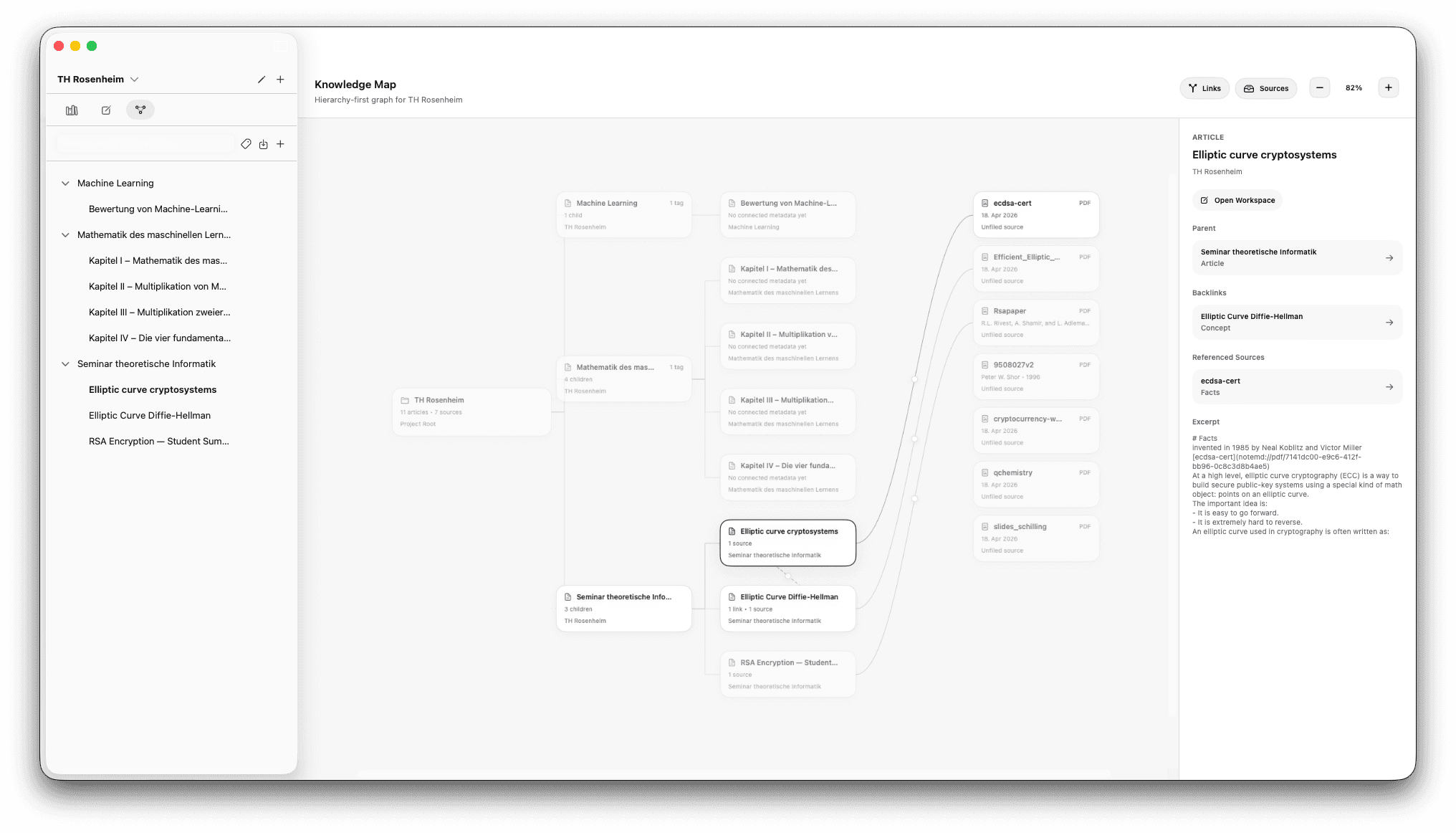
Articles on the left, sources on the right, mirroring your articles sidebar. Every /cite, /link, /wiki or /pdf you place in an article becomes an edge in the graph — your reading and writing build the network as you go.

note.md Graph View with articles on the left in sidebar hierarchy and sources on the right, connected by edges from in-article linking commands

Graph View doesn't ask you to draw the graph by hand. It assembles itself from the linking commands you place inside your articles — /cite, /link, /wiki, /pdf — and lays the result out the way you've already organized the project: articles on the left in the same hierarchy as your sidebar, sources on the right.

Step by step

How it works in note.md

  1. 1

    Populate both halves

    Articles in the left sidebar, sources in Knowledge Management. The graph reflects whatever you put in both — there is no separate graph to maintain, no extra schema to keep in sync.

  2. 2

    Link inside your articles

    Four slash commands build the connections from inside the editor: /cite and /pdf reach for sources (citations to specific bookmarks, or links to a project PDF), /wiki links to another article in the project, and /link handles external URLs. Every one of those becomes an edge the moment you save.

  3. 3

    Read the layout

    Open Graph View and the network draws itself: articles render on the left in the same hierarchy your sidebar shows, sources render on the right. Clusters, bridges and gaps in your coverage become obvious at a glance — the topology of your project, not just its file list.

  4. 4

    Label edges and (optionally) export

    Click any edge to assign a relation type — supports, contradicts, builds on, contextualises, whatever fits. When you want to run deeper analysis, export the whole graph in a Neo4j-friendly format for centrality, paths and community detection.

Common questions

About this workflow.

What is a knowledge graph in note-taking?
A knowledge graph is a visual map of how your notes and sources connect — each note or source is a node, each link is an edge. Instead of browsing a folder hierarchy, you navigate by relationships: which papers feed which article, which ideas reference which sources, and where the gaps in your coverage are.
How is this different from Obsidian's graph view?
Obsidian's graph is a topological visualisation of [[wiki links]] across your vault. note.md's Graph View does the same for /wiki, plus shows the cross-domain structure that matters for research: articles render on the left in the same hierarchy as your sidebar, sources render on the right, and edges from /cite and /pdf link claims directly to the PDF passages backing them. You can also label each edge with a relation type.
Do I have to draw the connections manually?
No. The graph assembles itself from the linking commands you place inside your articles — /cite, /link, /wiki and /pdf. Every link becomes an edge automatically. You can label the relation type on an edge afterwards if you want richer structure, but the graph itself is a side effect of writing, not a separate task.

Try this workflow on your Mac.

note.md is free on the App Store. Premium unlocks the local-AI steps.

Download on the App StoreFree on the App Store